Ray for AI Teams: Distributed Computing, Model Serving, and Multi-GPU Inference
A hands-on walkthrough of Ray's full stack - ending with a real deployment that splits a big model across two nodes.
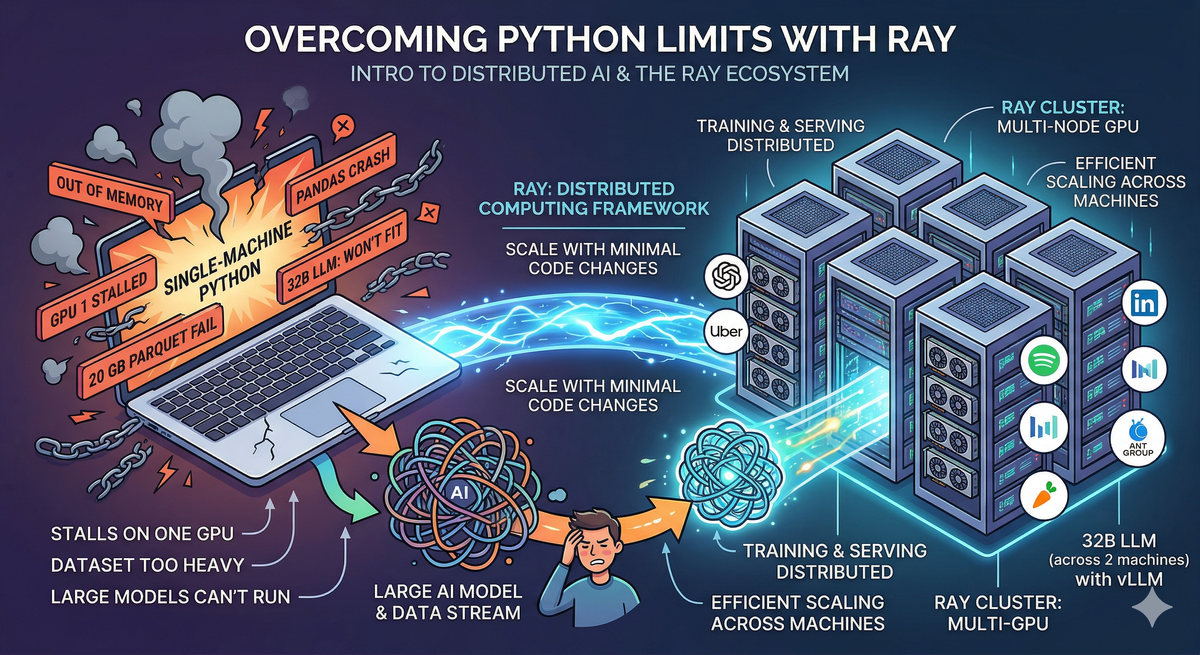
As AI models grow larger and datasets grow heavier, single-machine Python hits its limits fast. Training stalls on one GPU while others sit idle. Pandas crashes on a 20 GB parquet file. A 32B-parameter model won't fit in your GPU's memory no matter how you quantize it.
These aren't edge cases — they're the daily reality of working with modern AI. And they all point to the same underlying problem: Python wasn't built for distributed computing, and most ML tools assume everything fits on one machine. Ray changes that. It's an open-source distributed computing framework that lets you scale Python code from a laptop to a cluster of hundreds of machines — with minimal code changes.
This article is a practical walkthrough of the Ray ecosystem — what each component does, how they fit together, and why they matter. Along the way, I'll share a real implementation: building a multi-node GPU cluster and serving a 32B-parameter LLM across two machines using Ray and vLLM.
What is Ray?
Ray is an open-source, high-performance distributed execution framework primarily designed for scalable and parallel Python and machine learning applications. Ray is best understood as two layers: a general-purpose distributed runtime, and a set of AI-specific libraries built on top of it.
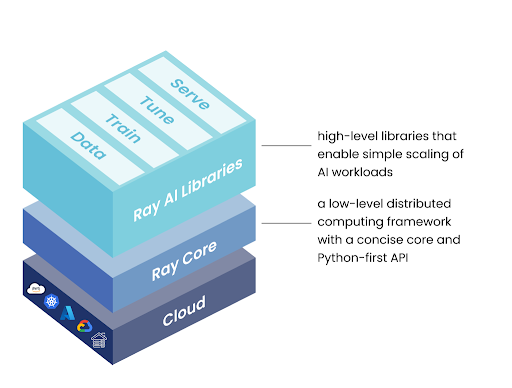
Ray Core is the foundation. It provides three primitives for distributed execution — tasks, actors, and objects — that let you parallelize any Python code across a cluster.
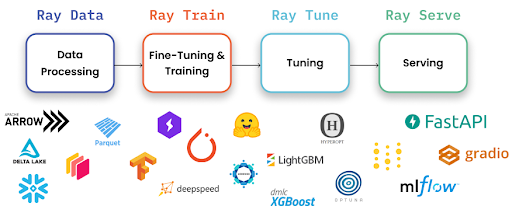
Ray AI Libraries are built on Ray Core and target specific ML workflows: data processing, distributed training, hyperparameter tuning, and model serving.
| Library | Purpose |
|---|---|
| Ray Data | Distributed data loading and preprocessing — handles datasets too large for pandas |
| Ray Train | Distributed model training across multiple GPUs/nodes |
| Ray Tune | Hyperparameter tuning with parallel trials |
| Ray Serve | Model serving with autoscaling, batching, and multi-model composition |
| RLlib | Reinforcement learning at scale |
The beauty is that these all share the same cluster. Your data preprocessing (Ray Data), model training (Ray Train), and model serving (Ray Serve) all run on the same Ray cluster, sharing GPUs and CPUs efficiently.
Ray Clusters connect multiple machines into one unified compute pool. A head node coordinates the cluster, worker nodes execute tasks, and a dashboard provides real-time monitoring of everything.
The entire ecosystem is open-source (Apache 2.0), backed by Anyscale, and integrates deeply with PyTorch, Hugging Face, vLLM, and the broader ML stack.
Who Actually Uses Ray in Production?
This matters because "works in a demo" and "runs in production at scale" are very different things.
- OpenAI uses Ray for distributed training and serving infrastructure
- Uber runs large-scale ML pipelines on Ray
- Spotify powers recommendation models with Ray
- Instacart uses Ray for feature engineering at scale
- Ant Group operates one of the largest Ray deployments globally
- Netflix, Shopify, LinkedIn, ByteDance — all run production Ray workloads
Ray Core: The Foundation
Ray Core gives you three building blocks for distributed computing:
Tasks — Parallel Stateless Functions
Take any Python function, add @ray.remote, and it runs in parallel across your cluster:
import ray

ray.init()

@ray.remote
def process_chunk(data):
    return transform(data)

# Launch 100 tasks in parallel — Ray handles scheduling
futures = [process_chunk.remote(chunk) for chunk in data_chunks]
results = ray.get(futures)  # Collect all results
Without Ray, this function runs sequentially on one core. With @ray.remote, Ray distributes it across every available CPU in the cluster. A workload that takes 30 seconds on a single core can finish in 3 seconds on a 12-core machine — or even faster across multiple nodes.
The key API pattern: .remote() launches a task asynchronously and returns a future (an ObjectRef). ray.get() blocks until the result is ready. This lets you fire off hundreds of tasks and collect results when you need them.
Actors — Stateful Distributed Classes
When you need to maintain state across calls — like a loaded ML model — actors keep that state in memory:
@ray.remote(num_gpus=1)
class ModelWorker:
    def __init__(self, model_path):
        self.model = load_model(model_path)  # Loaded once, stays in GPU memory

    def predict(self, inputs):
        return self.model(inputs)

# Create a worker — Ray assigns it a GPU automatically
worker = ModelWorker.remote("my_model.pt")

# Call it multiple times — model stays loaded
result1 = ray.get(worker.predict.remote(batch1))
result2 = ray.get(worker.predict.remote(batch2))
Actors are how Ray Serve manages model replicas internally. Each serving replica is an actor holding a loaded model, processing requests as they arrive.
Objects — Shared Distributed Data
Ray's object store lets tasks and actors share data efficiently across nodes without explicit serialization. When you pass an ObjectRef to another task, Ray handles the data transfer — even if the tasks run on different machines.
# Large data is stored once in Ray's object store
data_ref = ray.put(large_numpy_array)  # Store in shared memory

# Multiple tasks can read the same data without copying
futures = [process.remote(data_ref) for _ in range(10)]
These three primitives are deceptively simple, but they compose into complex distributed systems. Everything else in Ray — training, serving, data processing — is built on tasks and actors.
Ray Data: Scalable Data Processing
If you've worked with large parquet files or multi-gigabyte datasets, you know pandas breaks down quickly. It loads everything into memory at once — fine for a 500 MB CSV, catastrophic for a 50 GB training dataset.
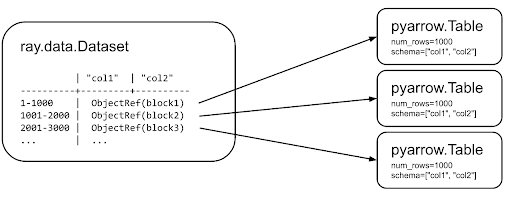
Ray Data solves this by streaming data in blocks and processing them in parallel:
import ray

# Pandas: loads entire file into memory → crashes on large files
# df = pd.read_parquet("huge_dataset.parquet")

# Ray Data: streams and processes in parallel, never loads everything at once
ds = ray.data.read_parquet("s3://bucket/huge_dataset.parquet")

# Transformations run in parallel across all available CPUs
ds = ds.map(lambda row: {"text": row["text"].lower(), "label": row["label"]})
ds = ds.filter(lambda row: row["label"] > 0)
Ray Data uses lazy evaluation — transformations aren't executed immediately. They're built up as a logical plan, optimized, and executed in a distributed manner when you request results. This means Ray can fuse operations, manage memory intelligently, and parallelize across nodes automatically.
For ML workflows, Ray Data integrates directly with Ray Train for feeding data into distributed training loops:
# Process in parallel batches — feeds directly into training
for batch in ds.iter_batches(batch_size=256):
    train_step(batch)
Ray Data handles formats and scales that break pandas — millions of rows, multi-gigabyte files, distributed across cloud storage or local disk. It's designed for last-mile data preprocessing before training or inference.
Ray Train: Distributed Model Training
Training a model on one GPU works — until the model gets bigger, the dataset gets larger, or you need results faster. Ray Train wraps distributed training frameworks (PyTorch DDP, DeepSpeed, Hugging Face Accelerate) with fault tolerance, automatic checkpointing, and resource management.
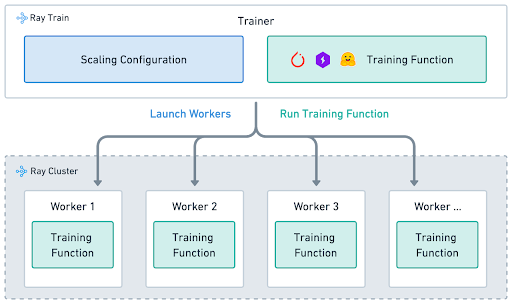
The core pattern: write a normal PyTorch training function, and Ray distributes it across multiple GPUs.
import ray.train.torch
from ray.train.torch import TorchTrainer
from ray.train import ScalingConfig

def train_func(config):
    # Standard PyTorch training code
    model = build_model(config["hidden_size"])
    optimizer = torch.optim.Adam(model.parameters(), lr=config["lr"])

    # Ray wraps model and dataloader for distributed training
    model = ray.train.torch.prepare_model(model)
    dataloader = ray.train.torch.prepare_data_loader(train_dataloader)

    for epoch in range(config["epochs"]):
        for batch in dataloader:
            loss = train_step(model, batch, optimizer)

        # Report metrics — Ray handles checkpointing and tracking
        ray.train.report({"loss": loss, "epoch": epoch})

# Launch across 4 GPUs — Ray manages process groups, gradient sync, everything
trainer = TorchTrainer(
    train_func,
    train_loop_config={"lr": 1e-4, "hidden_size": 768, "epochs": 10},
    scaling_config=ScalingConfig(
        num_workers=4,
        use_gpu=True,
        resources_per_worker={"CPU": 4, "GPU": 1}
    ),
)
result = trainer.fit()
What prepare_model and prepare_data_loader do behind the scenes:
- Wrap the model in
DistributedDataParallel(DDP) - Shard the dataset across workers so each processes a different subset
- Move tensors to the correct GPU device
- Handle gradient synchronization across workers
The advantage over raw PyTorch DDP: you don't manage torch.distributed.init_process_group(), you don't write mp.spawn() boilerplate, and if a worker crashes mid-training, Ray can restart it from the last checkpoint. For larger models, Ray Train integrates with DeepSpeed and FSDP for memory-efficient training that wouldn't fit with standard DDP.
Ray Tune: Hyperparameter Optimization at Scale
Tuning hyperparameters sequentially is painful. Train with lr=0.001 for 2 hours. Didn't work? Try 0.0001, wait another 2 hours. Ray Tune runs trials in parallel — 20 configurations simultaneously, each on its own GPU:
from ray import tune
from ray.tune.schedulers import ASHAScheduler

# Define what to search over
search_space = {
    "lr": tune.loguniform(1e-5, 1e-2),
    "batch_size": tune.choice([16, 32, 64]),
    "hidden_size": tune.choice([256, 512, 768]),
    "dropout": tune.uniform(0.1, 0.5),
}

# ASHA scheduler: aggressively stops bad trials early
# If a trial is underperforming after 5 epochs, it gets killed
# and its GPU is freed for more promising configurations
scheduler = ASHAScheduler(
    max_t=50,           # Maximum 50 epochs per trial
    grace_period=5,     # At least 5 epochs before early stopping
    reduction_factor=2  # Keep top 50% at each rung
)

tuner = tune.Tuner(
    train_func,
    param_space=search_space,
    tune_config=tune.TuneConfig(
        metric="loss",
        mode="min",
        num_samples=20,      # Try 20 combinations
        scheduler=scheduler,
    ),
)
results = tuner.fit()
best = results.get_best_result()
print(f"Best config: {best.config}")
The real power is in the schedulers. ASHA (Async Successive Halving) detects underperforming trials early and kills them, freeing GPUs for more promising configurations. A search that takes 40 hours sequentially (20 trials × 2 hours) can finish in 4-6 hours with 8 parallel trials and early stopping.
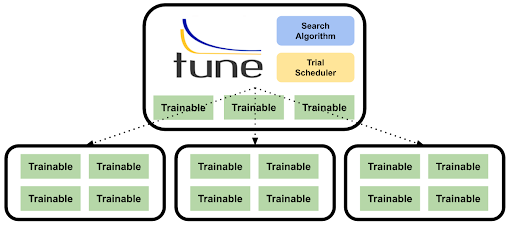
Ray Tune also supports Bayesian optimization (via Optuna integration), population-based training, and custom search algorithms — all with the same API.
Ray Serve: Model Serving in Production
Ray Serve is the deployment layer. It takes trained models and serves them as scalable API endpoints with features purpose-built for ML workloads:
from ray import serve

@serve.deployment(
    num_replicas=2,
    ray_actor_options={"num_gpus": 0.5}  # Each replica uses half a GPU
)
class SentimentModel:
    def __init__(self):
        self.model = load_model("sentiment_model.pt")

    async def __call__(self, request):
        data = await request.json()
        return {"sentiment": self.model.predict(data["text"])}

app = SentimentModel.bind()
serve.run(app)
# Model is now live at http://localhost:8000/
Key capabilities that matter in production:
Dynamic Request Batching groups incoming requests together automatically, maximizing GPU throughput without sacrificing latency. Instead of processing one request at a time (like using a 747 to transport one passenger), Ray batches them for parallel GPU processing.
Autoscaling adds or removes model replicas based on traffic. Set min_replicas, max_replicas, and target_ongoing_requests, and Ray scales your infrastructure in real-time. You can even scale to zero during idle periods.
Multi-Model Composition chains models into pipelines using Python — a language detector, translator, and LLM as one endpoint, each scaling independently. Unlike YAML-driven orchestration, this is regular Python: you get autocomplete, type checking, unit tests, and debugging.
@serve.deployment
class Preprocessor:
    def __call__(self, text):
        return clean_and_tokenize(text)

@serve.deployment(ray_actor_options={"num_gpus": 1})
class LLMModel:
    def __init__(self):
        self.model = load_llm()
    def __call__(self, tokens):
        return self.model.generate(tokens)

@serve.deployment
class Pipeline:
    def __init__(self, preprocessor, llm):
        self.preprocessor = preprocessor
        self.llm = llm

    async def __call__(self, request):
        data = await request.json()
        tokens = await self.preprocessor.remote(data["text"])
        return await self.llm.remote(tokens)

# Deploy entire pipeline as one endpoint
app = Pipeline.bind(Preprocessor.bind(), LLMModel.bind())
serve.run(app)
Each deployment in the pipeline scales independently — the preprocessor runs on CPU, the LLM on GPU, and Ray handles routing between them even if they're on different machines.
Fractional GPU Allocation packs multiple models onto one GPU. If an embedding model only needs 25% of a GPU, serve four of them on one card with num_gpus: 0.25.
All of this is framework-agnostic — PyTorch, TensorFlow, scikit-learn, and plain Python logic can coexist in the same deployment.
Ray Clusters: Unifying Multiple Machines
A Ray Cluster connects multiple machines into one compute pool. Two commands:
# Head node — starts the cluster
ray start --head --port=6379 \
    --dashboard-host=0.0.0.0 --dashboard-port=8265

# Worker node — joins the cluster
ray start --address='<HEAD_IP>:6379'
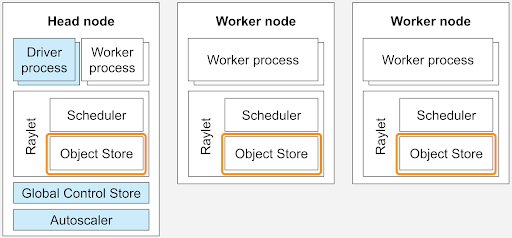
Once connected, all CPUs and GPUs across all nodes appear as one pool. Ray Core schedules tasks and actors across the entire cluster transparently — your code doesn't need to know which machine it's running on.
The Ray Dashboard (at http://<HEAD_IP>:8265) provides real-time visibility: node health, GPU memory, running actors, request metrics, and logs from all machines in a single view.
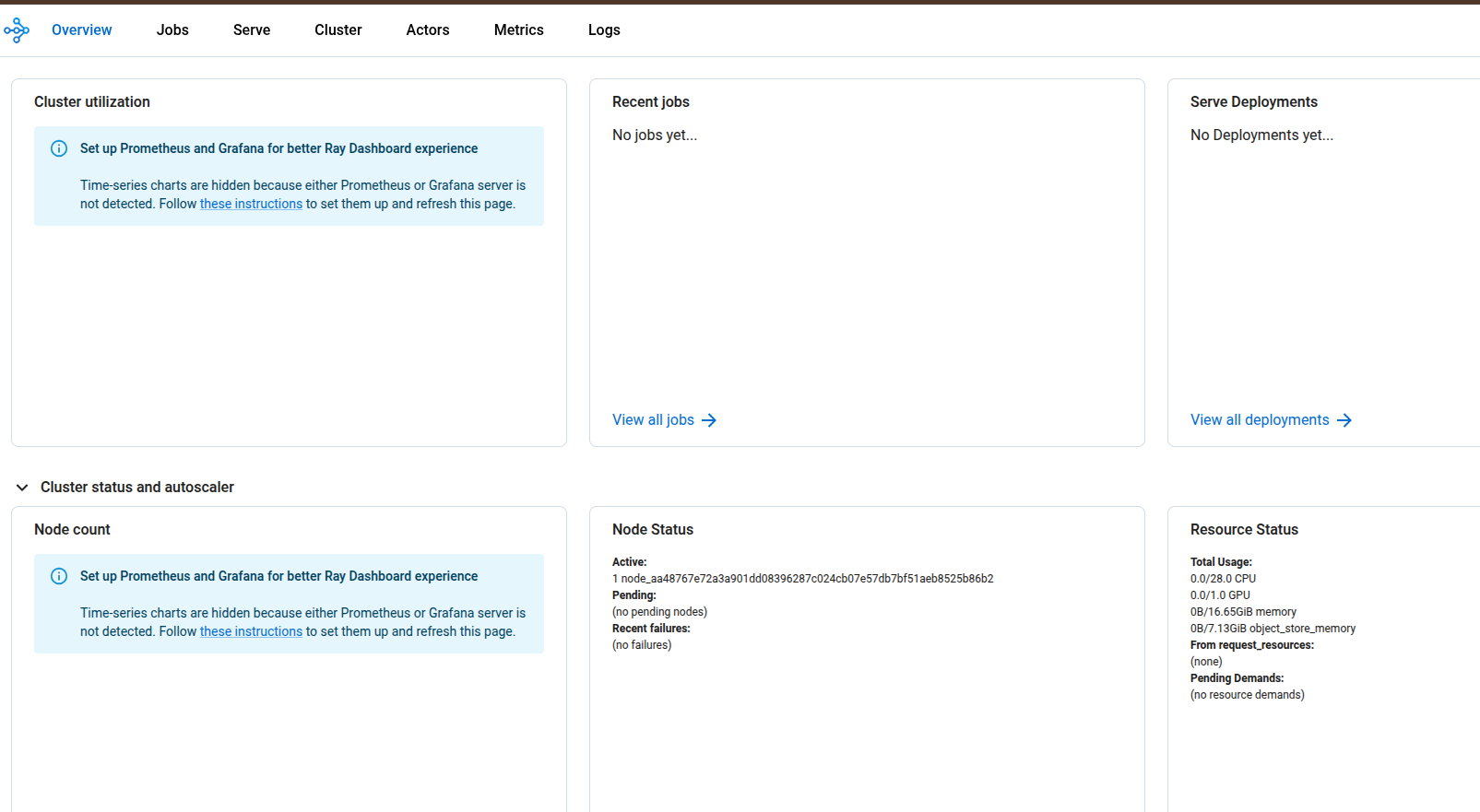
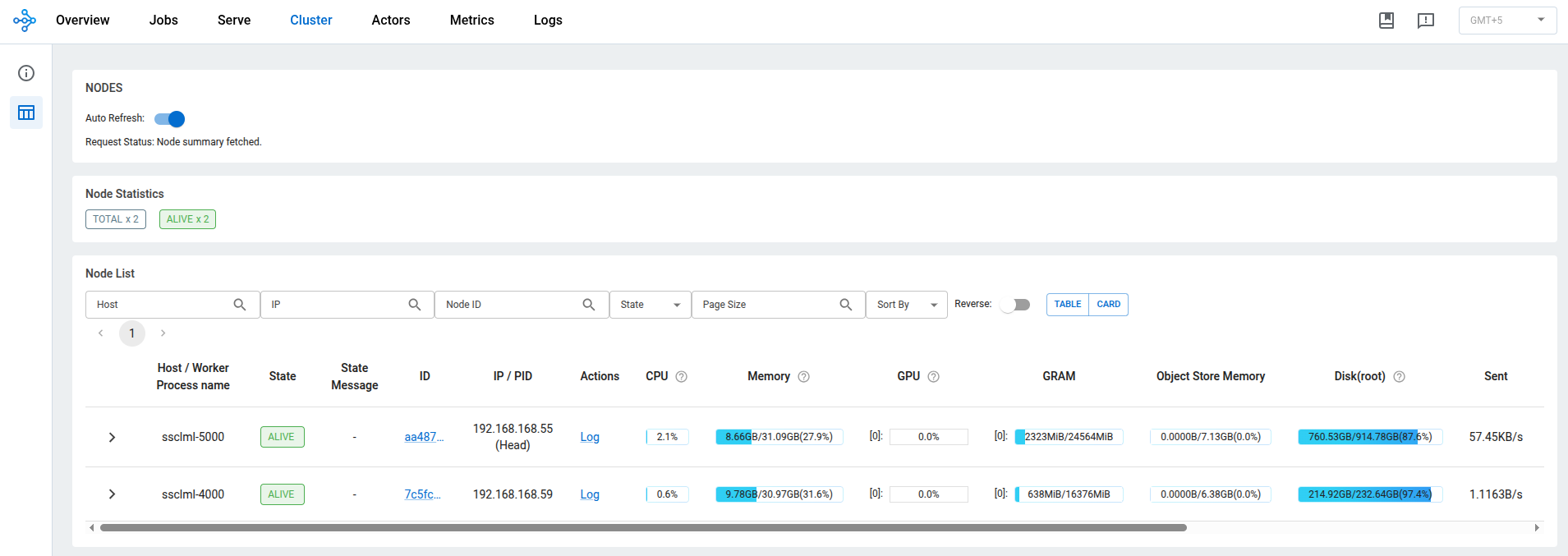
The important insight: all Ray libraries share the same cluster. Your data preprocessing (Ray Data), training (Ray Train), hyperparameter search (Ray Tune), and serving (Ray Serve) can coexist on the same cluster, sharing resources efficiently. One framework for the entire ML lifecycle.
Putting It Together: Multi-Node LLM Inference
With the fundamentals covered, here's a real use case where all these concepts come together.
The Problem
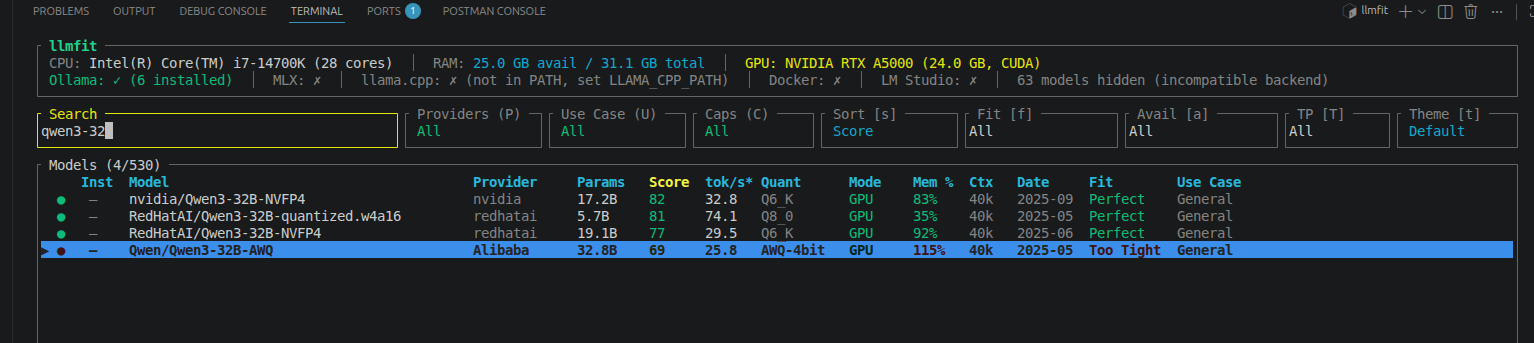
Our AI team had two GPU servers — an NVIDIA RTX A5000 (24 GB) and an RTX A4000 (16 GB). I was experimenting with Vision-Language Models and needed to test larger LLMs for evaluation, but the models I wanted to run (32B+ parameters) wouldn't fit on either GPU individually.
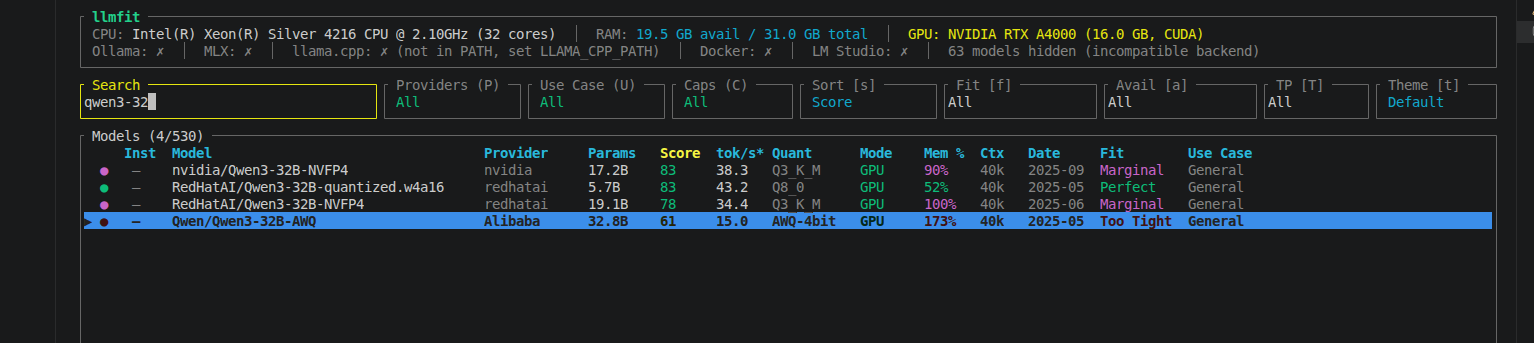
Using llmfit (a CLI tool for checking GPU memory fitness), Qwen3-32B-AWQ showed 115% memory required on the A5000 and 173% on the A4000 — both marked "Too Tight."
The Architecture
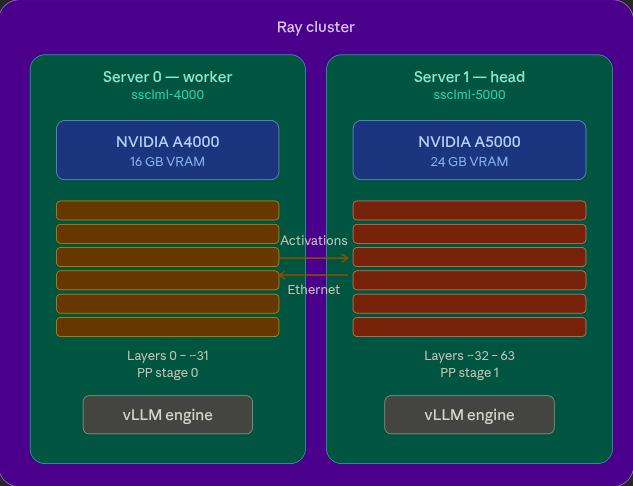
I connected both servers as a Ray cluster, then used vLLM with pipeline parallelism to split the model across both GPUs.
There are two strategies for splitting models across GPUs:
Tensor Parallelism (TP) splits each layer's weight matrices across GPUs. Requires identical VRAM and fast interconnects (NVLink) because GPUs communicate on every forward pass.
Pipeline Parallelism (PP) splits the model by layers — first half on GPU 0, second half on GPU 1. Communication happens only at the split point. Works with different GPU sizes and standard Ethernet.
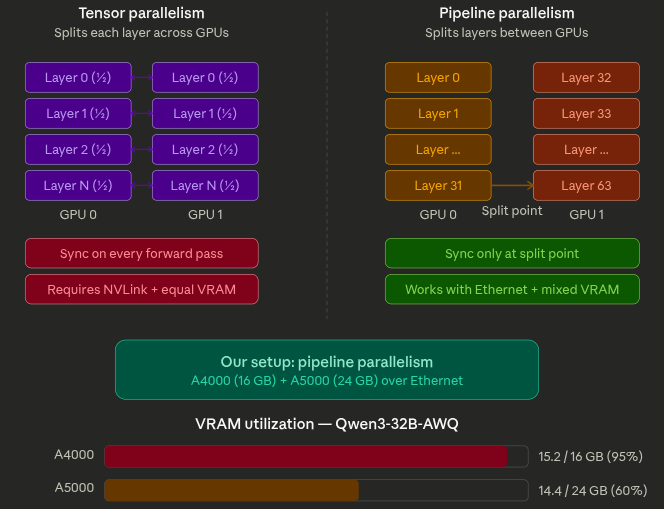
Our GPUs are asymmetric (16 GB vs 24 GB) and connected over Ethernet, so pipeline parallelism was the right choice.
The Implementation
# Start Ray cluster
# Head node (ssclml-5000, A5000)
ray start --head --port=6379 --dashboard-host=0.0.0.0 --dashboard-port=8265

# Worker node (ssclml-4000, A4000)
ray start --address='<HEAD_IP>:6379'

# Verify: should show 2 nodes, 2 GPUs
ray status
Then serve the model with vLLM using Ray as the distributed backend:
vllm serve Qwen/Qwen3-32B-AWQ \
    --tensor-parallel-size 1 \
    --pipeline-parallel-size 2 \
    --distributed-executor-backend ray \
    --max-model-len 4096 \
    --gpu-memory-utilization 0.90 \
    --enforce-eager \
    --host 0.0.0.0 --port 8000
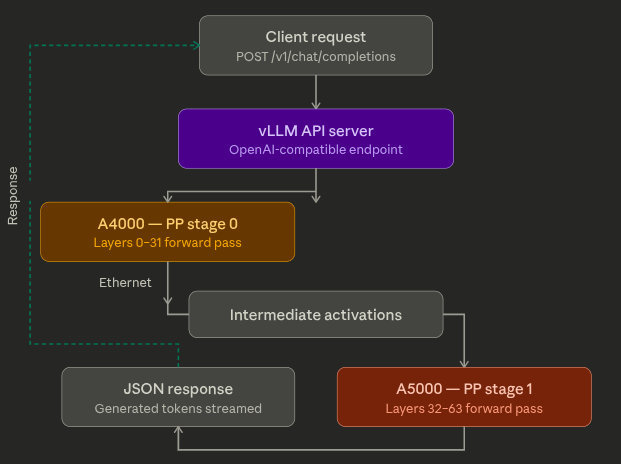
vLLM splits the model's 64 transformer layers into two stages (~32 each). Ray places one stage on each GPU. Tokens flow through GPU 0, intermediate states transfer over the network to GPU 1, and the API returns an OpenAI-compatible response.
curl -X POST http://localhost:8000/v1/chat/completions \
  -H "Content-Type: application/json" \
  -d '{
    "model": "Qwen/Qwen3-32B-AWQ",
    "messages": [{"role": "user", "content": "Explain distributed computing."}],
    "max_tokens": 256
  }'
Results
| Metric | Qwen3-14B (validation) | Qwen3-32B (production) |
|---|---|---|
| Parameters | 14.8B | 32.8B |
| Fits on single GPU? | Yes (tight) | No — impossible |
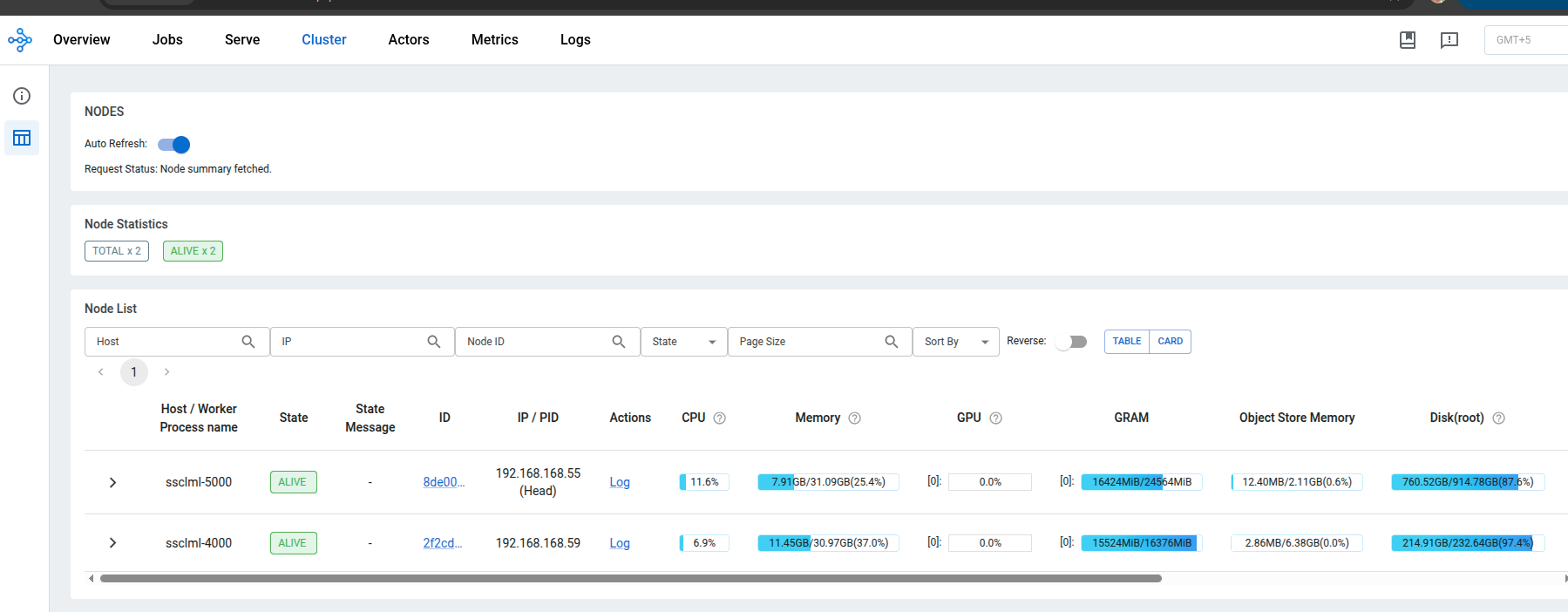
| A5000 VRAM | 13.1 GB / 24 GB | 14.4 GB / 24 GB |
| A4000 VRAM | 13.7 GB / 16 GB | 15.2 GB / 16 GB (95%) |
| API | OpenAI-compatible | OpenAI-compatible |
The A4000 at 95% VRAM confirms this model genuinely needs the cluster. We validated with a 14B model first (which fits on one GPU) to prove the architecture, then scaled to the 32B model that actually requires it.
Lessons for Developers Setting Up Distributed Inference
A few generalizable lessons from this work:
Networking fundamentals matter. Distributed computing is a networking problem first, an ML problem second. You need to understand IP addresses, network interfaces, hostname resolution, and firewall rules. Communication libraries like Gloo and NCCL are controlled through environment variables (GLOO_SOCKET_IFNAME, NCCL_SOCKET_IFNAME, VLLM_HOST_IP) — each node may need different values depending on its network configuration.
Pin your versions. The ML ecosystem moves fast, and distributed setups amplify version conflicts. Ray, vLLM, PyTorch, and CUDA all need to be compatible with each other. Test upgrades carefully and always have a fallback configuration.
Start small, then scale. Validate your architecture with a model that fits on one GPU first. Once the cluster works end-to-end, move to the model that actually requires it. This isolates infrastructure bugs from model-specific issues.
Environment parity across nodes. Every node in the cluster needs the same Python environment, same package versions, and access to the model weights. Model files must be downloaded to each node independently if they don't share a filesystem.
Future Work
- DGX Spark cluster — connecting two NVIDIA DGX Spark nodes with QSFP for 200 Gbps interconnect. With 128 GB unified memory per node (256 GB combined), this enables 70B+ models at full precision, and potentially Llama-3.1-405B with quantization
- Multi-model serving — deploying specialized models (LLM for generation, embedding model for RAG, VLM for multimodal) on the same Ray cluster with fractional GPU allocation
- Distributed fine-tuning — using Ray Train to fine-tune models across multiple GPUs on the same cluster used for serving
- VLM and VLA pipelines — serving Vision-Language and Vision-Language-Action models for robotics research, with Ray Data handling image/video preprocessing at scale
Ray CLI Cheatsheet
Cluster Management
ray start --head --port=6379 --dashboard-host=0.0.0.0    # Start head
ray start --address='<HEAD_IP>:6379'                       # Join as worker
ray status                                                  # Cluster status
ray stop                                                    # Stop Ray
ray stop --force                                            # Force stop
Jobs and Monitoring
ray job submit --working-dir . -- python my_script.py      # Submit job
ray job list                                                # List jobs
ray job logs <JOB_ID>                                       # View logs
# Dashboard: http://<HEAD_IP>:8265
Ray Serve
serve run my_app:app                                        # Deploy app
serve status                                                # Check status
serve shutdown -y                                           # Shutdown
vLLM + Ray (Distributed LLM Inference)
# Pipeline parallelism across 2 nodes
vllm serve <MODEL> \
    --pipeline-parallel-size 2 \
    --distributed-executor-backend ray \
    --max-model-len 4096 \
    --gpu-memory-utilization 0.90 \
    --enforce-eager \
    --host 0.0.0.0 --port 8000

# Tensor parallelism on one node with 4 GPUs
vllm serve <MODEL> --tensor-parallel-size 4
Environment Variables for Distributed Work
export VLLM_HOST_IP=<NODE_IP>                              # Node's real IP
export GLOO_SOCKET_IFNAME=<INTERFACE>                      # Network interface
export NCCL_SOCKET_IFNAME=<INTERFACE>                      # GPU comm interface

# Find your interface: ip -br addr | grep <YOUR_SUBNET>
# Prevent env propagation to workers:
echo '["GLOO_SOCKET_IFNAME","NCCL_SOCKET_IFNAME"]' > \
    ~/.config/vllm/ray_non_carry_over_env_vars.json
Debugging
nvidia-smi --query-gpu=name,memory.used,memory.total --format=csv   # GPU usage
lsof -i :<PORT>                                                      # Port check
pkill -9 -f gcs_server && rm -rf /tmp/ray/*                          # Clean reset
python3 -c "import socket; print(socket.gethostbyname(socket.gethostname()))"  # Hostname check
huggingface-cli download <MODEL>                                     # Download model
Python Quick Start
import ray

ray.init()                          # Connect to cluster (or start local)
print(ray.cluster_resources())      # {'CPU': 60.0, 'GPU': 2.0, ...}

@ray.remote
def hello():
    return "Hello from the cluster!"

print(ray.get(hello.remote()))

@ray.remote(num_gpus=1)
def gpu_task():
    import torch
    return torch.cuda.get_device_name(0)

print(ray.get(gpu_task.remote()))
ray.shutdown()
Final Thoughts
Ray's value isn't in any single feature — it's in the unified framework. Data processing, training, tuning, and serving all share the same cluster, the same resource manager, and the same programming model. You learn one set of concepts (tasks, actors, objects) and apply them across the entire ML lifecycle.
The architecture I built with two workstation GPUs follows the same pattern used at OpenAI, Uber, and Spotify with thousands of GPUs. The scale is different. The principles are identical. That's the real value of learning Ray — you're building on infrastructure patterns that work at every scale.
Whether you're processing datasets too large for pandas, training models across multiple GPUs, tuning hyperparameters in parallel, or serving models that don't fit on a single card — Ray provides a coherent path from prototype to production.
Built with Ray 2.52.1, vLLM 0.18.0, and Qwen3 models by Alibaba Cloud. Pipeline parallelism over standard Ethernet — no NVLink or InfiniBand required.
Resources
- Official Documentation: docs.ray.io
- GitHub Repository: ray-project/ray
- Community Forum: discuss.ray.io
- Tutorials: ray.io
- Examples: Ray Examples
Have questions? Find me on LinkedIn.
Mahtab Newaz
Robotics Machine Learning Engineer
Spectrum Software & Consulting (Pvt.) Ltd.
Tags: Ray vLLM Distributed Computing LLM Inference GPU Cluster Pipeline Parallelism Ray Serve Ray Train Ray Data MLOps AI Infrastructure