Spring Data JPA Relationships: The Complete Developer’s Guide

Master @OneToOne, @OneToMany, and @ManyToMany with Real Code Examples
What You Will Learn
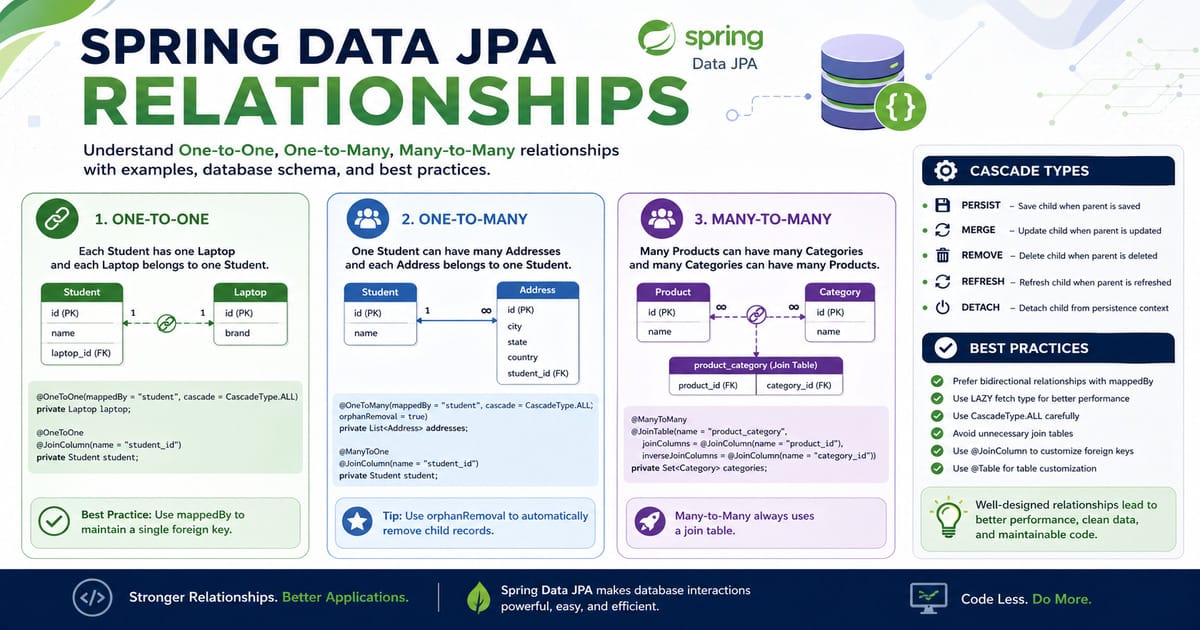
This guide covers all types of JPA entity relationships — @OneToOne, @OneToMany, @ManyToMany — with uni-directional and bi-directional variants, cascade types, fetch strategies, and the @Table annotation. Each section includes annotated code examples and the resulting database schema, so you know exactly what SQL gets generated.
Table of Contents
- What Are JPA Relationships?
- @OneToOne Relationship
- @OneToMany Relationship
- @ManyToMany Relationship
- Cascade Types in JPA
- Fetch Types: EAGER vs LAZY
- The @Table Annotation Explained
- Quick Reference Cheat Sheet
- Conclusion & Further Reading
1. What Are JPA Relationships?
In Java Persistence API (JPA), entity relationships define how two database tables are associated. Just like a relational database uses foreign keys to connect tables, JPA uses annotations to mirror those relationships in Java objects. Getting these relationships right is fundamental to writing clean, efficient Spring Boot applications.
JPA supports four core relationship types:
- @OneToOne — One record in Table A maps to exactly one record in Table B
- @OneToMany — One record in Table A maps to multiple records in Table B
- @ManyToOne — Many records in Table A map to one record in Table B
- @ManyToMany — Many records in Table A map to many records in Table B
Each relationship can be configured as uni-directional (only one entity knows about the other) or bi-directional (both entities are aware of each other). Understanding the difference is key to avoiding n+1 query problems and unnecessary join tables.
2. @OneToOne Relationship
A @OneToOne relationship means a single row in one table is associated with exactly one row in another. The classic example: one Student has one Laptop.
2a. Uni-Directional @OneToOne
Only the Student entity knows about the Laptop. The Laptop has no reference back to the student.
Student.java |
Laptop.java |
@Entity public class Student { @Id @GeneratedValue( strategy=GenerationType.IDENTITY) private Long id; private String name;
@OneToOne private Laptop laptop; } |
@Entity public class Laptop { @Id @GeneratedValue( strategy=GenerationType.IDENTITY) private Long id; private String brand; } |
Result: A laptop_id foreign key column is created in the student table. The Laptop entity has no knowledge of Student. |
|
2b. Bi-Directional @OneToOne (with mappedBy)
Both entities are aware of each other. The mappedBy attribute tells JPA which side owns the foreign key. Only the owning side generates the foreign key column in the database.
Student.java |
Laptop.java |
@Entity public class Student { @Id @GeneratedValue( strategy=GenerationType.IDENTITY) private Long id; private String name;
@OneToOne(mappedBy="student", cascade=CascadeType.ALL) private Laptop laptop; } |
@Entity public class Laptop { @Id @GeneratedValue( strategy=GenerationType.IDENTITY) private Long id; private String brand;
@OneToOne @JoinColumn(name="student_id") private Student student; } |
Result: Only one foreign key (student_id) is generated, in the laptop table. mappedBy="student" references the student field in Laptop.java. |
|
Pro Tip: Custom Foreign Key Names Use @JoinColumn to rename the foreign key: @JoinColumn(name = "std_id", referencedColumnName = "id"). The referencedColumnName points to the primary key of the Student table. |
Database Schema — @OneToOne
Table / Column |
Description |
student |
id (PK), name |
laptop |
id (PK), brand, student_id (FK → student.id) |
3. @OneToMany Relationship
A @OneToMany relationship represents a parent with multiple children. Example: one Student can have many Addresses.
3a. Uni-Directional @OneToMany
When no mappedBy is used, JPA creates a join table by default to manage the relationship.
Student.java |
Address.java |
@Entity public class Student { @Id @GeneratedValue( strategy=GenerationType.IDENTITY) private Long id; private String name;
@OneToMany(cascade=CascadeType.ALL) @JoinColumn(name="student_id") private List<Address> addresses; } |
@Entity public class Address { @Id @GeneratedValue( strategy=GenerationType.IDENTITY) private Long id; private String city; private String state; private String country; } |
Adding @JoinColumn directly on the List<Address> field avoids the extra join table and instead creates a student_id FK in the address table. |
|
3b. Bi-Directional @OneToMany
The recommended approach. Use @ManyToOne on the child side and mappedBy on the parent. No join table is needed.
Student.java |
Address.java |
@Entity public class Student { @Id @GeneratedValue( strategy=GenerationType.IDENTITY) private Long id; private String name;
@OneToMany(mappedBy="student", cascade=CascadeType.ALL, orphanRemoval=true) private List<Address> addresses; } |
@Entity public class Address { @Id @GeneratedValue( strategy=GenerationType.IDENTITY) private Long id; private String city; private String state; private String country;
@ManyToOne @JoinColumn(name="student_id") private Student student; } |
Result: No extra join table. student_id FK is placed directly in address table. orphanRemoval=true ensures that addresses with no parent student are automatically deleted. |
|
What is orphanRemoval? When orphanRemoval = true, removing an Address from the student.addresses collection automatically deletes it from the database on the next save. Without it, the Address row would remain orphaned in the DB. |
Database Schema — @OneToMany (Bi-directional)
Table / Column |
Description |
student |
id (PK), name |
address |
id (PK), city, state, country, student_id (FK → student.id) |
4. @ManyToMany Relationship
A @ManyToMany relationship means both entities can relate to multiple instances of each other. Example: a Product can belong to many Categories, and a Category can contain many Products.
4a. Uni-Directional @ManyToMany
Product.java |
Category.java |
@Entity public class Product { @Id @GeneratedValue( strategy=GenerationType.IDENTITY) private Long id; private String name;
@ManyToMany @JoinTable( name="product_category", joinColumns=@JoinColumn( name="product_id"), inverseJoinColumns=@JoinColumn( name="category_id")) private Set<Category> categories; } |
@Entity public class Category { @Id @GeneratedValue( strategy=GenerationType.IDENTITY) private Long id; private String name; } |
A join table product_category is always required for ManyToMany. joinColumns defines the FK for the owning entity (Product); inverseJoinColumns defines the FK for the inverse entity (Category). |
|
4b. Bi-Directional @ManyToMany
Product.java |
Category.java |
@Entity public class Product { @Id @GeneratedValue( strategy=GenerationType.IDENTITY) private Long id; private String name;
@ManyToMany(mappedBy="products") private Set<Category> categories = new HashSet<>(); } |
@Entity public class Category { @Id @GeneratedValue( strategy=GenerationType.IDENTITY) private Long id; private String name;
@ManyToMany @JoinTable( name="product_category", joinColumns=@JoinColumn( name="category_id"), inverseJoinColumns=@JoinColumn( name="product_id")) private Set<Product> products = new HashSet<>(); } |
Product uses mappedBy="products" pointing to the products field in Category, making Category the owner of the relationship. |
|
Database Schema — @ManyToMany
Table / Column |
Description |
product |
id (PK), name |
category |
id (PK), name |
product_category |
product_id (FK → product.id), category_id (FK → category.id) |
Important Note In JPA, a ManyToMany relationship ALWAYS requires a join table in the database. There is no way to model a true many-to-many without one, because each entity needs to link to multiple records on the other side. |
5. Cascade Types in JPA — Complete Reference
Cascade types control what happens to child entities when an operation is performed on the parent. When you use CascadeType.ALL, it is equivalent to enabling all five individual cascade types below.
Cascade Type |
Behavior |
CascadeType.PERSIST |
Saving the parent also saves all child entities automatically. |
CascadeType.MERGE |
Updating the parent merges (updates) child entities as well. |
CascadeType.REMOVE |
Deleting the parent also deletes all associated child entities. |
CascadeType.REFRESH |
Refreshing the parent from the DB also refreshes child entities. |
CascadeType.DETACH |
Detaching the parent from the persistence context detaches children too. |
CascadeType.ALL |
Equivalent to enabling all of the above cascade types at once. |
Best Practice: Avoid using CascadeType.REMOVE on @ManyToMany relationships, as it may cause unintended mass deletions when one side is removed.
6. Fetch Types: EAGER vs LAZY
Fetch type controls when JPA loads related entities from the database. Choosing the wrong fetch type is one of the most common causes of performance issues in Spring Boot apps.
@OneToMany(fetch = FetchType.LAZY) private List<Book> books;
Table / Column |
Description |
FetchType.EAGER |
Loads related entities immediately when the parent is fetched. Use only when the related data is ALWAYS needed. |
FetchType.LAZY |
Loads related entities only when they are explicitly accessed. Default for @OneToMany and @ManyToMany. Always prefer LAZY. |
SEO Insight / Performance Tip FetchType.LAZY is the default for @OneToMany and @ManyToMany. FetchType.EAGER is the default for @ManyToOne and @OneToOne. Overriding defaults to EAGER in large data sets causes N+1 query problems. Use Spring Data JPA @EntityGraph or JOIN FETCH queries instead. |
7. The @Table Annotation Explained
When building production-ready Spring Boot applications, the default JPA mappings aren't always enough. You need control over table names, column constraints, and ID generation strategies. That's where the @Table annotation—and its powerful companions—come in.
✅ Example: User Entity with @Table
@Data // Generates getters, setters, toString, etc.
@Entity // Marks this class as a JPA entity
@Builder // Enables builder pattern
@NoArgsConstructor // No-args constructor
@AllArgsConstructor // All-args constructor
@Table(
    name = "tbl_user",
    uniqueConstraints = @UniqueConstraint(
        name = "unique_mobile",
        columnNames = "mobile_no"
    )
)
public class User {

    @Id
    @Column(name = "user_id")
    @SequenceGenerator(
        name = "user_sequence",
        sequenceName = "user_sequence",
        allocationSize = 1
    )
    @GeneratedValue(
        strategy = GenerationType.SEQUENCE,
        generator = "user_sequence"
    )
    private Long userId;

    @Column(
        name = "mobile_no",
        nullable = false
    )
    private String mobileNo;

}
🔍 Explanation of @Table Annotation
🔹 7.1. What is @Table?
The @Table annotation is used to define the mapping between your entity and database table.
@Table(name = "tbl_user")
✔️ This means:
- The
Userentity will be mapped to a table namedtbl_user - If not specified, JPA would use the default name (
user)
🔹 7.2. What is uniqueConstraints?
uniqueConstraints = @UniqueConstraint(
name = "unique_mobile",
columnNames = "mobile_no"
)
✔️ This defines a unique constraint at the database level.
👉 Key Points:
- Ensures no duplicate values in the specified column
- Improves data integrity
- Enforced directly by the database
🔹 7.3. Constraint Name
name = "unique_mobile"
✔️ This is the name of the constraint in the database.
Why it matters:
- Helps in debugging
- Makes database schema more readable
- Useful for migrations and DB management
🔹 7.4. Column with Unique Constraint
columnNames = "mobile_no"
✔️ This means:
- The column
mobile_nomust be unique - No two users can have the same mobile number
🔥 Final Outcome in Database
The generated table will look like:
Table: tbl_user
user_id→ Primary Keymobile_no→ NOT NULL + UNIQUE
✔️ Prevents duplicate mobile numbers
✔️ Ensures better data consistency
8. Quick Reference Cheat Sheet
Table / Column |
Description |
@OneToOne (Uni) |
FK in the source entity table |
@OneToOne (Bi) + mappedBy |
FK only in the owning side (non-mappedBy side) |
@OneToMany (Uni) + @JoinColumn |
FK in the child (many) table, no join table |
@OneToMany (Bi) + mappedBy |
FK in child table, no join table |
@ManyToMany |
Always creates a join table |
CascadeType.ALL |
All persistence ops propagate to children |
orphanRemoval=true |
Removes child from DB when removed from collection |
FetchType.LAZY |
Load children only on access (preferred) |
FetchType.EAGER |
Load children immediately with parent |
@JoinColumn(name=...) |
Customize the FK column name |
mappedBy=... |
Marks the non-owning side; prevents duplicate FKs |
9. Conclusion
Understanding Spring Data JPA entity relationships is one of the most valuable skills you can build as a Java developer. By choosing the right relationship type, configuring mappedBy correctly, and combining cascade types with fetch strategies thoughtfully, you can build high-performance, maintainable database layers in your Spring Boot applications.
✅ JPA Relationship Best Practices (2026)
- Always use
mappedByon the inverse side to prevent duplicate foreign keys. - Prefer
@JoinColumnover join tables for@OneToMany. - Initialize collections (
new ArrayList<>()) to avoidNullPointerException. - Never cascade
REMOVEon@ManyToMany. - Use
orphanRemoval = trueonly when the child’s lifecycle depends entirely on the parent. - Keep fetch type
LAZYand load eagerly via queries when needed. - Test schema generation with
spring.jpa.hibernate.ddl-auto=validatein production.
❓ Frequently Asked Questions (FAQ)
Q1: What’s the difference between mappedBy and @JoinColumn?@JoinColumn defines the physical foreign key column. mappedBy tells JPA which field owns the relationship, making the current entity the inverse side.
Q2: When should I use orphanRemoval = true?
When child entities shouldn’t exist without a parent (e.g., OrderLineItem without an Order).
Q3: EAGER or LAZY: Which is better for performance?LAZY is almost always better. EAGER forces immediate loading and often causes the N+1 query problem.
Q4: Why does JPA create a join table for @OneToMany by default?
It’s a fallback to avoid modifying the child table. Override it with @JoinColumn(name = "parent_id") for cleaner schemas.
Q5: How do I fix the N+1 query problem?
Use @EntityGraph, JOIN FETCH in JPQL, or Spring Data JPA’s @Query("SELECT a FROM Author a JOIN FETCH a.books").
Further Reading:
Antes de elegir entre camiseta local de fútbol, merece la pena comprobar si se trata de una camiseta local, visitante o alternativa. La decisión queda mejor respaldada al comprobar la talla disponible y las opciones de personalización.
Official Spring Data JPA Documentation
Tags: Spring Data JPA, JPA Relationships, Hibernate, OneToOne, OneToMany, ManyToMany, Spring Boot, Java ORM, Entity Mapping